ST8008 – Billed CPT Summary
Function:
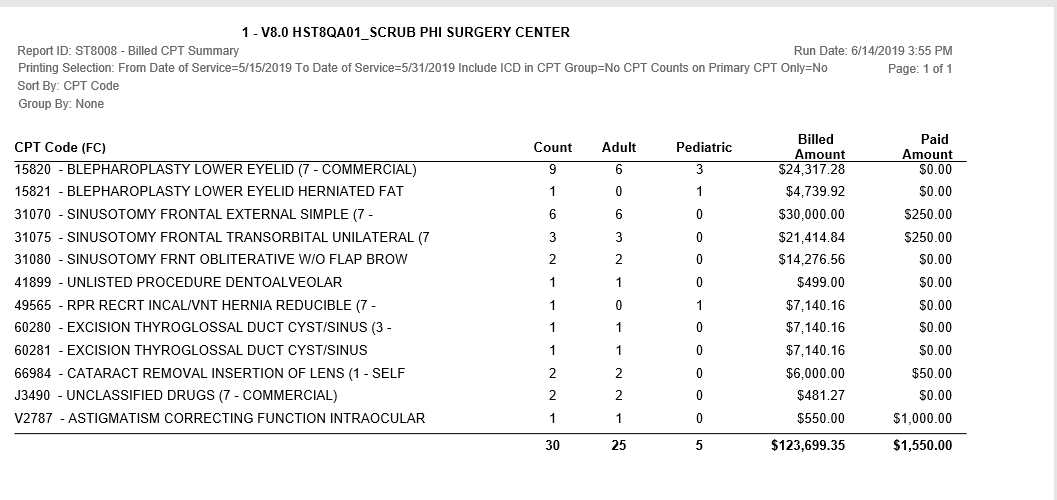
Summary CPT billing and reimbursement information. Pulls from Charge Entry and also from Payments and Adjustments.
Paid Amount comes from entries in Payments and Adjustments, Line Item; enter reimbursements at the CPT level to see them here.
This report includes Total count, Pediatric count and Adult counts of procedures.
Usage:
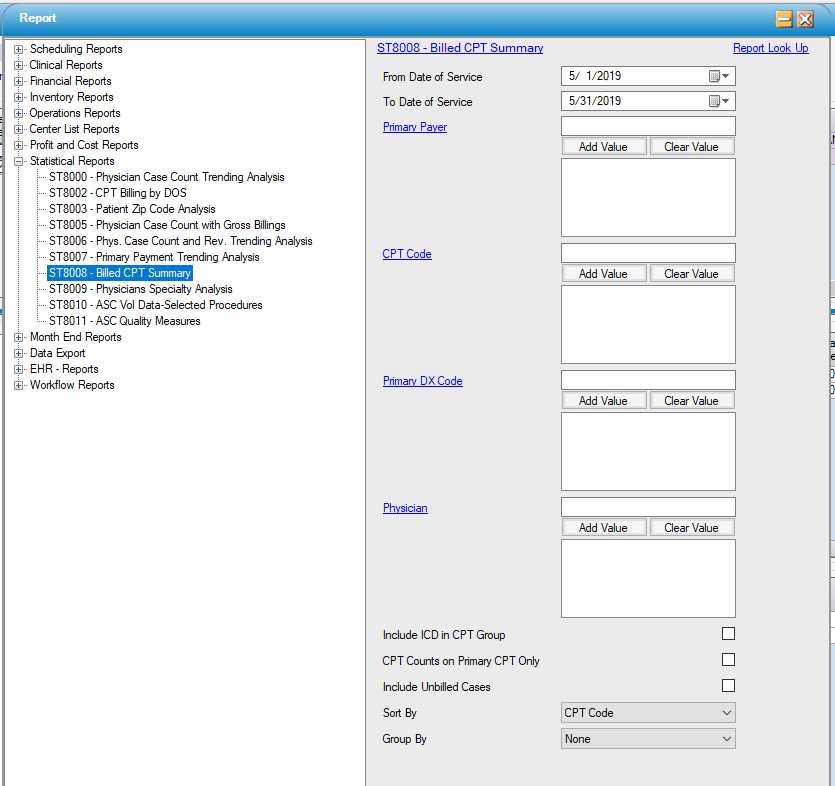
- The date of service range defaults to last calendar month. Select specified Primary Payer ID(s), CPT(s) or Physician ID(s).
- Results can be sorted by CPT Code, CPT Count (descending), CPT Count (ascending), Billed Amount (descending) or Billed Amount (ascending).
- Results can be grouped by Financial Class, Primary Payer, Physician or Date of Service.
Hints and Tips:
- GROUP to see subtotals by grouping selection (primary payer, physician, or date of service).
- This report captures primary procedures by Pediatric and Adults and can be used for Leap Frog reporting.
Sample Report:
For more information on report output options, view Reports Overview help page.
Report Filter:
 .
.